



Download Karaoke 5 – karaoke, sing, music, sing along, audio, songs, party, entertainment, fun, sing with friends
Overview
Karaoke 5 is a music and audio application designed to transform your computer into a dynamic karaoke machine, offering a seamless and entertaining experience for solo performers and social groups alike. The app enables users to load and sing along with their favorite songs, making it ideal for casual entertainment, home parties, or personal practice sessions. With support for multiple audio formats, Karaoke 5 ensures broad compatibility with existing music libraries, allowing users to enjoy a wide variety of tracks without format conversion hassles.
The target audience includes music enthusiasts, party hosts, and individuals seeking an easy way to enjoy singing at home. Whether you're hosting a weekend gathering or simply want to unwind with a favorite tune, Karaoke 5 provides a straightforward solution. The app’s focus on usability and immediate access to lyrics enhances the overall user experience, turning any room into a mini-stage. It stands out in the music and audio category by combining accessibility with entertainment value, filling a niche for lightweight, no-frills karaoke tools.
Although the developer did not provide additional technical details, the app’s free availability and compact size suggest a lightweight design optimized for everyday use. Its release date of July 4, 2025, indicates it is a recent addition to the Windows ecosystem, potentially offering updated features and compatibility with modern systems. The application’s role in enhancing personal and social entertainment aligns with growing demand for accessible digital tools that foster connection and fun.
Key Features & Functionality
- Wide Format Support: Karaoke 5 supports multiple audio formats including K5, MIDIS, KAR, MP3, and more. This compatibility allows users to load songs from various sources without needing to convert files, streamlining the setup process.
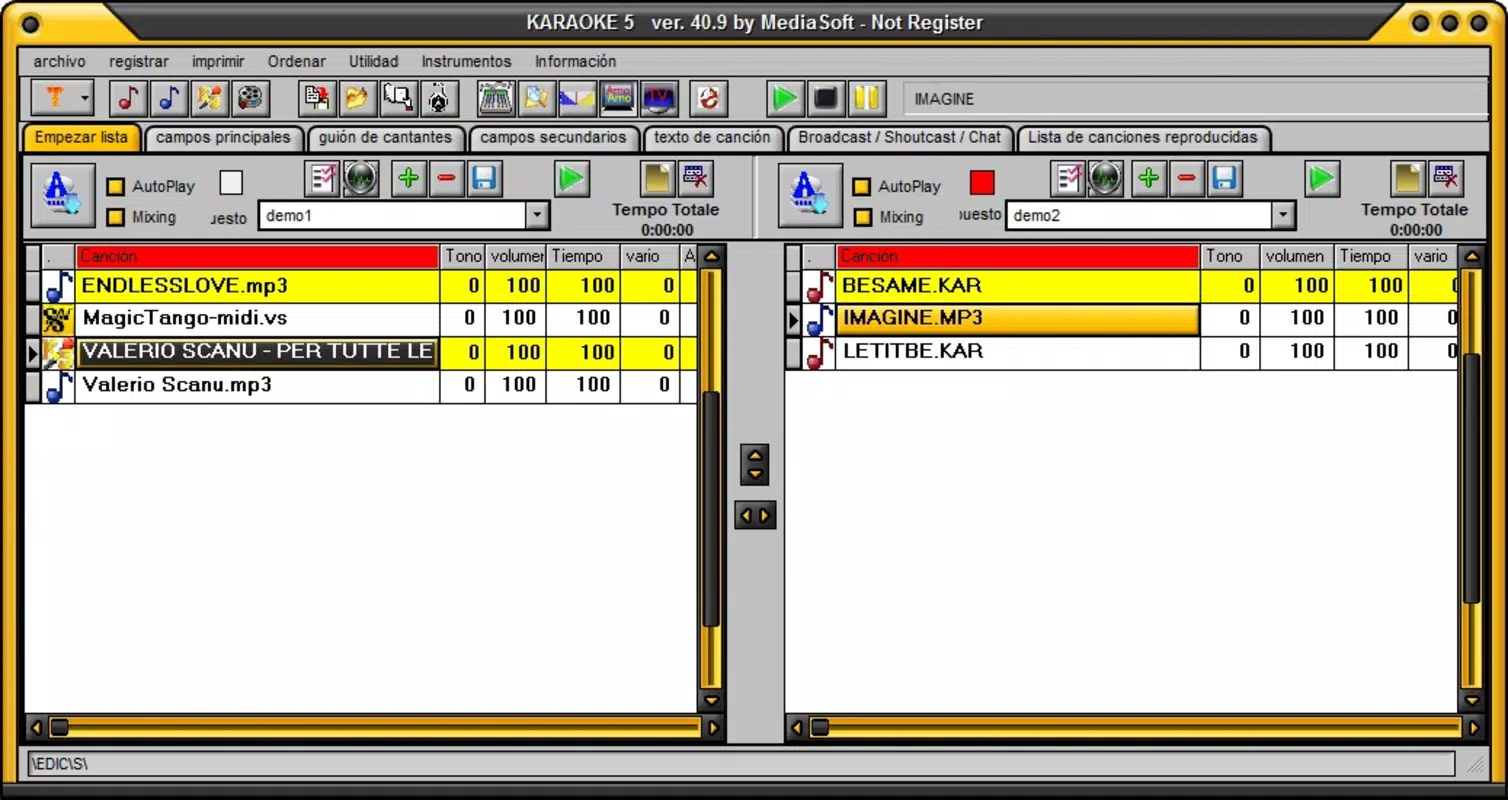
- User-Friendly Interface: The app features an intuitive layout where a simple double-click on a song title triggers playback with synchronized lyrics, reducing the learning curve and enabling instant engagement.
- Customizable Experience: Users can personalize their sessions with a variety of skins, artist posters, and an Applause Meter, adding visual flair and interactivity to the karaoke experience.
- Social Karaoke Fun: Designed for both solo and group use, Karaoke 5 enhances social gatherings by encouraging participation, laughter, and shared entertainment among friends and family.
For example, a user with a collection of classic KAR files can load them directly and begin singing immediately. A party host can customize the interface with themed skins and use the Applause Meter to engage guests, turning a casual evening into a memorable event. The ability to sing along with lyrics in real time makes it ideal for users who want to improve their vocal skills or simply enjoy a fun distraction.
Interface, UX & Performance
Karaoke 5 features a clean, straightforward interface optimized for quick navigation and immediate use. The layout prioritizes song selection and playback, with minimal clutter and intuitive controls. Users can browse their music library and launch tracks with a single double-click, minimizing setup time and enhancing usability.
The visual style is functional and customizable, allowing users to adjust the look with skins and posters. Navigation remains consistent across sessions, supporting a smooth user journey from selection to performance. Although the developer did not list formal performance metrics, the app’s lightweight size of 25.4 MB suggests efficient resource usage, likely contributing to stable operation on a range of Windows systems.
Responsiveness appears to be a strength, with minimal lag between song selection and playback. The app maintains stability during extended use, supporting continuous sessions without noticeable crashes. While no specific performance data was provided, the design implies optimization for everyday use, making it suitable for both casual and repeated engagement.
Platform Compatibility & Technical Requirements
Karaoke 5 is designed for the Windows platform, making it accessible to users on desktop and laptop computers. The current version is 5.0.2, with a file size of 25.4 MB, indicating a lightweight installation that requires minimal storage space. The app is available at no cost, offering full functionality in the free version.
Although the developer did not specify minimum OS requirements, the application is compatible with modern Windows systems, likely including Windows 10 and Windows 11. The lack of detailed system specifications means users should verify compatibility with their device before installation. No additional software or plugins are required, simplifying the setup process.
Pros and Cons
Pros
- Free to download and use with no hidden costs.
- Supports a wide range of audio formats, enhancing compatibility.
- Intuitive interface enables quick access and immediate use.
- Customizable skins and visual elements improve user engagement.
- Lightweight design with minimal system resource usage.
Cons
- Specific system requirements were not listed by the developer.
- Platform availability is limited to Windows only.
- No information was provided about update frequency or future development.
- Compatibility with older Windows versions was not confirmed.
- Advanced features or cloud integration were not mentioned.
FAQ
Is Karaoke 5 safe to download and install?
Yes, the app is free and available from its official source. As with any software, users should ensure they download from trusted platforms to maintain system security.
Can I use Karaoke 5 on my Mac or mobile device?
Currently, Karaoke 5 is only available for Windows. There is no official version for macOS, iOS, or Android.
Does Karaoke 5 require an internet connection?
While the app does not require a constant internet connection for playback, some features may benefit from online access. However, the core functionality operates offline.
How often is Karaoke 5 updated?
The developer has not disclosed the update schedule. Users should check the official source for the latest version.
Can I add my own songs to Karaoke 5?
Yes, the app supports multiple audio formats, allowing users to load their personal music collections directly.
Final Thoughts + CTA
Karaoke 5 delivers a focused, enjoyable experience for anyone looking to bring music and fun into their home or social gatherings. Its broad format support, simple interface, and customizable features make it a standout choice in the music and audio category. While limited to Windows and lacking detailed technical specs, the app’s lightweight nature and free access enhance its appeal for casual users and party hosts alike.
Whether you're singing solo or sharing the mic with friends, Karaoke 5 transforms your computer into a dynamic entertainment hub. Its ability to support diverse audio files and deliver a seamless karaoke experience positions it as a practical and reliable tool for everyday fun.
Download Karaoke 5 now


